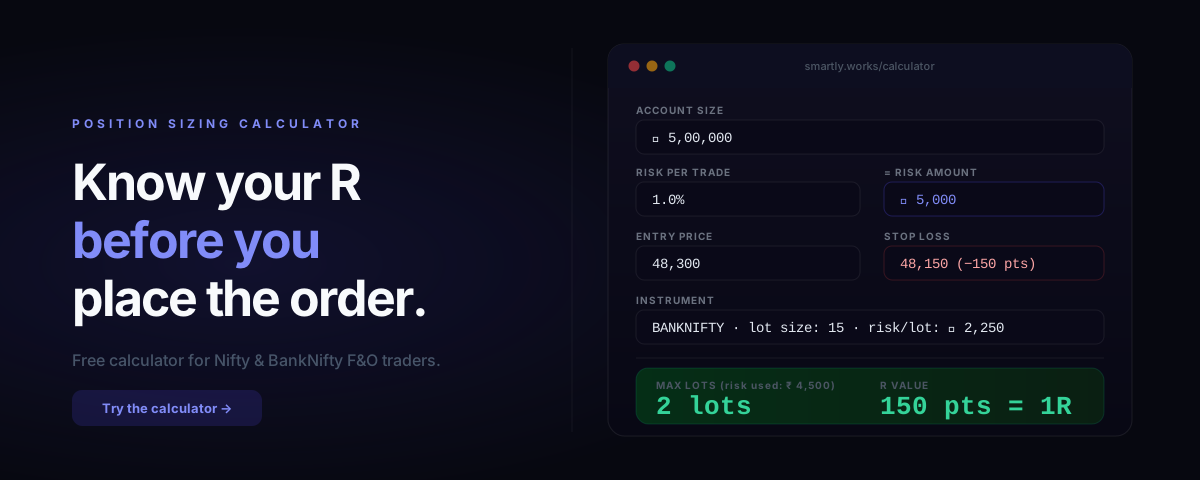
Most Indian F&O traders size positions in one of two ways: they trade one lot because they always trade one lot, or they trade whatever their broker's margin calculator says they can afford.
Neither of these is position sizing. Both are guesses dressed up as decisions.
R multiple position sizing gives you a precise answer: given your account size, your risk tolerance, and your specific entry and stop for this trade — how many lots should you be trading? The answer changes with every trade. That's the point.
This post explains the R calculation, walks through a concrete Nifty example, and links to the free calculator you can use before every session.
What Is an R Multiple?
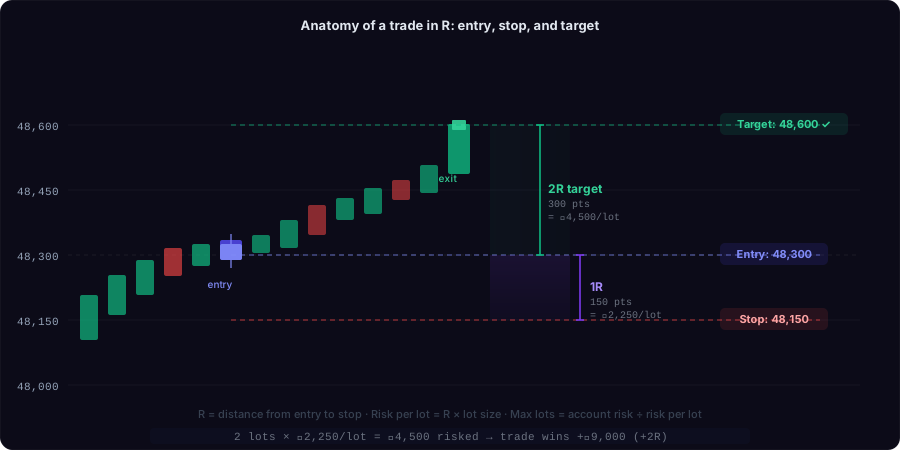
R is the distance from your entry to your stop loss — denominated in points, then converted to rupees per lot, then used to calculate how many lots you can trade without exceeding your account risk limit.
A trade that wins 2× what you risked is a +2R trade. A trade where you hit your stop is a -1R trade. A full post on why R is the most important trading metric is here.
But R is only useful if you calculate it before the trade — because that's when position sizing happens.
The Formula
Risk amount (₹)  =  Account size  ×  Risk %

Risk per lot (₹)  =  Stop distance (pts)  ×  Lot size

Max lots  =  floor( Risk amount ÷ Risk per lot )
Example — BankNifty:
| Variable | Value |
|---|---|
| Account size | ₹5,00,000 |
| Risk per trade | 1% = ₹5,000 |
| Entry | 48,300 |
| Stop loss | 48,150 |
| Stop distance | 150 points |
| BankNifty lot size | 15 units |
| Risk per lot | 150 × 15 = ₹2,250 |
| Max lots | floor(5,000 ÷ 2,250) = 2 lots |
| Actual risk | 2 × ₹2,250 = ₹4,500 (0.9% of account) |
You risk ₹4,500. If the trade works and your target is 300 points away (2R), you earn ₹9,000. If it doesn't and you hit your stop, you lose ₹4,500. Everything is known before you enter.
The Free Calculator
Run these numbers for every trade using the free calculator at smartly.works/calculator. Enter your account size and risk percentage once. Then for each trade, enter the entry price, stop loss price, and instrument — and get the correct lot count instantly.
The calculator handles all Indian F&O instruments and updates lot sizes when they change (NSE revises lot sizes periodically).
Direct link → smartly.works/calculator
How to Use It: Step by Step
Step 1: Enter your account size and risk %
Use your actual trading capital — not your full account balance if you keep savings in the same account. If you trade with ₹3,00,000 of your ₹8,00,000 account, enter ₹3,00,000.
Risk % is your maximum loss per trade as a percentage of that capital. Most professional traders use 0.5–1%. Beginners should start at 0.5% and increase only after 30+ consistent sessions.
Step 2: Set your stop loss before looking at position size
This is the most important discipline point. Your stop needs to come from the chart — from support, from the prior candle low, from a volatility band. It should not come from "what maximum loss can I afford per trade."
If you set your stop based on position size, you will always widen it unconsciously to get more lots. That's backwards.
Step 3: Enter the instrument and prices
The calculator fills in the current lot size automatically. Enter your planned entry price and stop loss price. The stop distance is calculated for you.
If you don't have a specific entry yet (you're doing pre-market planning), use the current price as a proxy. The lot count will change slightly when the actual setup triggers, but it gives you a sizing range.
Step 4: Note the lot count and the actual risk amount
The calculator shows you both. The lot count is your position size. The risk amount tells you what a 1R loss looks like in rupees — check that you're actually comfortable losing that amount today.
If the answer is "no, that would really hurt if I lost it today" — reduce your risk % until the risk amount feels manageable. Position sizing should let you take every valid setup without fear. If any single trade outcome has emotional weight, your size is too large.
Common Mistakes
Mistake 1: Using margin required as position size guidance
Broker margin calculators tell you the minimum margin needed to hold a lot. That has nothing to do with how much you should risk. You can hold 10 lots of NIFTY on margin while your actual risk tolerance is 1 lot. The margin calculator enables the mistake; R calculation prevents it.
Mistake 2: Ignoring the stop entirely
"I'll exit when it moves against me" is not a stop loss. Without a specific price, the calculator cannot tell you how many lots to trade — and you're flying blind on risk.
Mistake 3: Sizing one lot always because "that's safe"
One lot is often too large. On a tight stop (50 points NIFTY × 75 lot size = ₹3,750 risk per lot), one lot might be the right size for a ₹5,00,000 account risking 1%. On a wide stop (200+ points), one lot might be 4× your intended risk. One lot is not a position sizing strategy.
Mistake 4: Rounding up
The formula says floor() — round down, never up. If the math says 1.7 lots, trade 1 lot. Rounding up to 2 lots increases your risk by 18% above your limit.
Using R to Track Your Edge Over Time
Once you're sizing consistently in R, your trade log becomes meaningful across instruments and time periods.
A BankNifty trade from January and a Nifty trade from March are now comparable: both are measured in R. A +1.8R win on BankNifty and a +1.8R win on Nifty represent the same quality of outcome relative to risk.
This lets you calculate expectancy — the average R per trade across your history:
Expectancy = (Win% × Avg win in R) − (Loss% × Avg loss in R)
A positive expectancy means your strategy has an edge that will compound over time. A negative expectancy means the strategy will destroy capital regardless of position size.
Most traders never calculate expectancy because they track rupees, not R. You can't calculate expectancy in rupees across different setups and lot sizes. You can in R.
SMARTly calculates your expectancy automatically after every session and displays it on your dashboard — so you can see whether your edge is improving or degrading as market conditions change.
FAQ
What lot size should I use for Nifty 50 options?
The current Nifty 50 lot size is 75 units. BankNifty is 15 units. FinNifty is 40 units. MidcpNifty is 75 units. The calculator uses the current NSE-specified lot sizes.
My stop is 300 points on BankNifty and the calculator says 0 lots. What do I do?
300 points × 15 = ₹4,500 risk per lot. If your risk amount is ₹3,000 (₹3,00,000 account at 1%), the calculator correctly shows 0 lots — the trade is too large for your account at this stop distance. Either skip the trade, wait for a tighter entry, or accept a smaller risk % (but don't widen the stop).
Should I always use exactly 1%?
No. 1% is a common default. Many experienced traders use 0.5% on unclear setups and 1.5% on high-conviction A-grade setups. The key is pre-committing to the risk percentage for each setup type before market open — not adjusting it in real time after seeing the P&L.
Does this work for intraday vs positional?
Yes — the formula is the same. For positional trades, account for potential gap risk by using a slightly larger buffer in your stop calculation.
The Mental Shift
The reason most traders don't use R-based sizing isn't that it's difficult — the calculator does the math in three seconds. It's that using it requires committing to a specific stop loss before entering. That commitment makes every trade decision conscious and deliberate.
If you don't know where you're wrong, you don't actually have a trade. You have a bet.
The calculator forces the question. Once you answer it consistently, position sizing stops being a source of account blow-ups and starts being a competitive advantage.
SMARTly records every trade with its R value automatically and tracks your cumulative expectancy, setup win rates, and discipline score across sessions — free for Indian F&O traders.
Related reading: