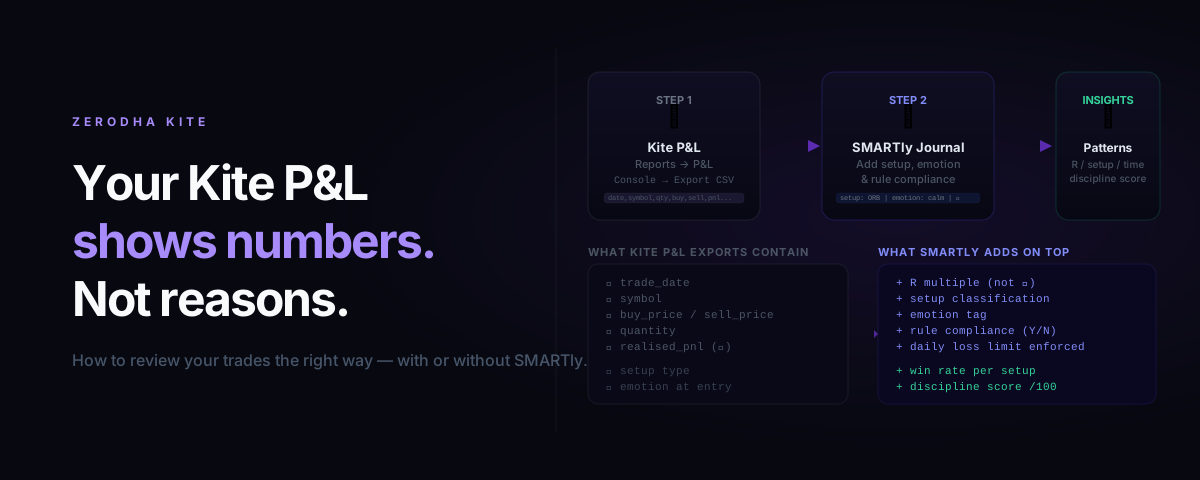
Zerodha Kite is excellent at telling you what happened. It's not designed to tell you why it happened, which setups are actually working, or whether your discipline is improving.
If you're using the P&L report as your only form of trade review, you're reading the scoreboard but not the game tape.
This post covers exactly how to export your trade data from Kite, what the export contains, what it doesn't, and how to turn raw trade data into the kind of analysis that actually improves your trading.
What Kite's P&L Report Shows
Zerodha Kite has two relevant reports in the Console section:
1. Tradebook — every individual buy and sell order with timestamp, price, and quantity
2. P&L Report — realised profit and loss per symbol, rolled up by day or date range
Both are useful. Neither answers the questions that matter most for improvement.
| What Kite shows | What you need to know |
|---|---|
| Total P&L in ₹ | P&L in R multiples |
| Number of trades | Win rate by setup type |
| Symbol and quantity | Whether you followed your rules |
| Entry / exit prices | Emotional state at entry |
| Charges and taxes | Discipline score |
The rupee P&L number is influenced by position size, luck, and market conditions. R-normalised performance and setup win rate tell you whether your actual decision-making has an edge.
How to Export Your Trade Data from Zerodha Kite
Here is the exact path to download your trade history from Zerodha Console:
Step 1: Log in to Console
Go to console.zerodha.com — this is separate from the Kite trading terminal. Use your Zerodha credentials.
Step 2: Navigate to Reports → P&L
In the left sidebar: Reports → P&L
Select the date range you want to analyse. For a meaningful review, use at least 30 trading days (roughly 6 weeks). Shorter periods will show too much noise.
Step 3: Choose the segmented view
Switch to Segment-wise view and select Equity F&O (or whichever segment you trade). This separates your F&O trades from equity delivery trades in the export.
Step 4: Export as CSV
Click the Download button (top right of the P&L table). Choose CSV format. The file downloads immediately.
For the Tradebook (individual orders rather than aggregated P&L), navigate to Reports → Tradebook and use the same download option.
What the Kite CSV Contains
The P&L export CSV has these columns:
symbol, isin, quantity, buy_value, sell_value, realised_pnl, unrealised_pnl
The Tradebook CSV is more granular:
trade_id, trade_date, exchange, symbol, trade_type (buy/sell),
quantity, price, order_id
This is enough to reconstruct every trade — entry price, exit price, quantity, P&L. It is not enough to analyse the trade.
What the Kite CSV Doesn't Contain
The CSV does not know:
- Why you entered — was this an Opening Range Breakout, a VWAP reclaim, an impulse trade after a loss?
- Whether you followed your rules — did you use your planned stop, or move it because the trade looked like it was "almost there"?
- Your emotional state — were you calm, frustrated, chasing FOMO?
- Your setup's long-term win rate — you can calculate raw win rate from the CSV but you can't separate win rate by setup without manually tagging every trade
All of those dimensions require you to add data that the broker can never provide.
Doing the Review in a Spreadsheet
Here's a basic framework if you want to work from the CSV:
Step 1: Reconstruct R for each trade
Add a column for stop_loss_price — you will need to fill this in from memory or your notes. Then calculate:
stop_distance_pts  = ABS(entry_price − stop_loss_price)
risk_per_lot_inr   = stop_distance_pts × lot_size
r_value            = realised_pnl ÷ risk_per_lot_inr
If you don't have your stop loss prices logged, this step is impossible to do accurately. This is the biggest reason to log your stop with every trade as you place it — not reconstruct it after the fact.
Step 2: Categorise every trade by setup type
Add a setup column. Tag every trade with the pattern you were trading: ORB (Opening Range Breakout), VWAP reclaim, support/resistance, trend continuation, impulse/unplanned.
This is tedious if you're doing it retrospectively. After 30 trades it usually takes 45–60 minutes to tag them honestly.
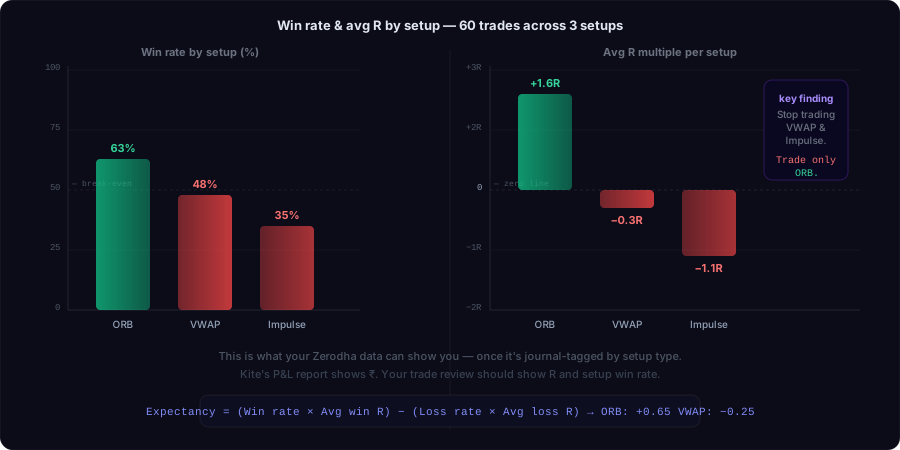
Step 3: Calculate win rate and avg R per setup
Use a pivot table:
| Setup | Trades | Win Rate | Avg Win R | Avg Loss R | Expectancy |
|---|---|---|---|---|---|
| ORB | 18 | 61% | +1.8R | −0.9R | +0.75R |
| VWAP reclaim | 22 | 45% | +1.2R | −1.1R | +0.04R |
| Impulse trades | 12 | 33% | +1.0R | −1.3R | −0.54R |
This table will immediately show you which setups have positive expectancy and which are actively costing you money. Most traders are surprised — the setups they trade most confidently are often the worst performers.
What You Cannot Learn from a Spreadsheet
The spreadsheet approach hits a wall quickly:
1. You can't correlate discipline with outcomes
The spreadsheet cannot tell you that your win rate on ORB setups drops from 68% to 41% when you're "frustrated" — because frustration isn't in the data.
2. You can't enforce pre-session rules
The Kite CSV is a post-session report. It records what happened. It cannot warn you before you take a trade that breaks your own criteria.
3. You can't build consistency habits
Reviewing a spreadsheet is a retrospective task. Building a discipline score that you track session by session, builds consistent habits over time through positive reinforcement — not periodic guilt.
4. Manual tagging is slow enough that most traders give up
The one-hour retrospective tagging session works approximately twice before you stop doing it. Real trade journals only work if you complete them in real time, at the moment of entry and exit.
Using SMARTly with Your Zerodha Data
SMARTly is a trade journal built for Indian F&O traders that solves the problem above.
During the session:
- Log each trade as you take it — setup, stop loss, entry price, exit price, emotion
- The R calculation is done automatically from your stop loss and position size
- The daily loss limit checks whether you're still within your risk rules
After the session:
- Win rate by setup is computed automatically
- Discipline score (0–100) across all sessions lets you track whether you're improving
- Expectancy per setup surfaces which patterns have an edge and which don't
You still use Kite for execution. SMARTly is the journal layer that converts execution data into learning data.
The One Thing Most Traders Miss
The Kite P&L report creates a cognitive illusion: because the numbers look precise (₹3,247 profit), they feel like analysis. They're not. Precision is not insight.
The analysis question isn't "how much did I make this week?" It's "which decisions I made this week should I repeat, and which should I stop making?"
The Kite CSV gives you the raw material. The analysis requires setup tagging, R normalisation, and emotion/rule data that only you can provide.
The traders who improve consistently are the ones who capture that data in real time, not the ones who reconstruct it on Sundays from memory.
Practical Starting Point
If you want to start this week without any new tools:
- Export your last 30 days of trade data from Kite Console
- Spend one hour tagging every trade with the setup type (be honest about impulse trades)
- Calculate win rate and average R for each setup
- Identify your single worst-performing setup by expectancy
- Remove that setup from your allowed trades for the next 30 sessions
That one change — removing your negative-expectancy setup — is typically worth more than any new strategy.
If you want the ongoing system: SMARTly gives you setup win rates, discipline score, and expectancy tracking automatically. Free for Indian F&O traders.
SMARTly works alongside Zerodha Kite — you trade in Kite, you journal in SMARTly. Win rate by setup, expectancy, and discipline score calculated automatically after each session.
Related reading: