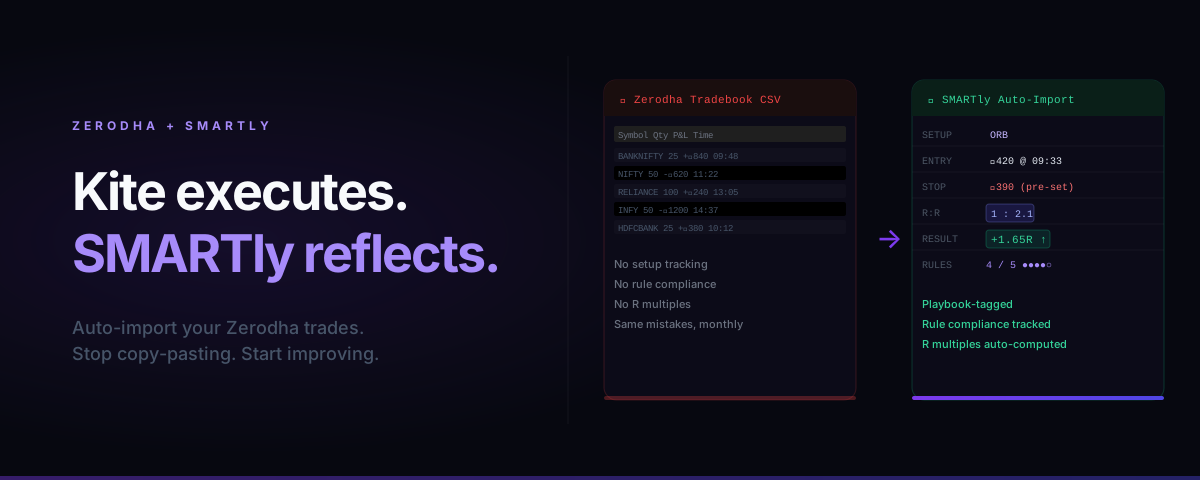
Zerodha Kite is the best execution terminal in India. It is not a trade journal.
Kite shows you P&L. It does not show you why you made or lost that P&L. It doesn't tell you which setup has edge, which time of day you consistently over-trade, or which rule you break whenever the market opens with a gap.
That's not a criticism of Zerodha — execution terminals aren't designed for reflection. But if you're serious about improving, you need a separate layer on top of Kite that captures the behavioral data Kite ignores.
What Zerodha Gives You (and What It Doesn't)
Zerodha's default tooling for trade review:
| Tool | What it shows | What it misses |
|---|---|---|
| Kite P&L page | Trade-level P&L, charges | Setup, rule compliance, R multiples |
| Console reports | Monthly/yearly P&L | Trade-level behavior data |
| Tradebook CSV | Raw execution data | Any context about why you took the trade |
The tradebook CSV is the closest you get to raw data — and it's useful as a starting point. But importing a CSV every day, manually tagging each trade to a setup, and computing R multiples by hand is the kind of friction that kills journaling habits.
The Three Things a Zerodha Journal Must Capture
Before choosing a journaling method, know what data you actually need:
1. Setup tag
Which of your defined setups triggered this trade? Opening Range Breakout, VWAP reclaim, earnings gap fade? If you can't answer this after the trade, you're speculating — not executing a system.
2. Rule compliance score
Before entry, you should have a checklist (5 items maximum). Each trade gets a score: 4/5, 5/5, etc. Track this for a month and you'll find that your losing trades cluster at 2/5 and below.
3. R multiple
Not rupee P&L — R multiple. If your stop loss was ₹30 and you made ₹45, that's +1.5R. If you lost ₹60, that's -2R. R multiples normalize for position size, so you can compare trade quality across different instruments and lot sizes.
Method 1: Manual Zerodha Journal (Spreadsheet)
If you want full control, here's the minimum viable spreadsheet structure:
Date | Instrument | Setup | Direction | Entry | SL | Target | Exit | R:R | Actual R | Rules (n/5) | Notes
Import step: Download tradebook from Console → paste Entry/Exit price, date, instrument.
Manual step: Add setup tag, pre-defined SL, R:R at entry, rule score, one-line note.
Realistic time: 3–5 minutes per trade. With 20 trades a week, that's 1–2 hours of admin. Most traders keep this up for 2–3 weeks, then stop when markets get busy.
Method 2: Auto-Import with SMARTly
SMARTly connects directly to Zerodha via the Kite API. Once connected:
- Trades auto-populate in your journal as they close
- You add the setup tag, rule score and a one-line note (under 60 seconds per trade)
- R multiples compute automatically from your pre-defined stop loss
- Weekly breakdown shows P&L by setup, rule-compliance distribution, and emotion tags
The import is read-only — SMARTly never places trades or touches your account. It only reads your execution history.
What gets auto-filled:
- Instrument, direction, quantity
- Entry and exit time and price
- Gross P&L and charges
What you add (30–60 seconds):
- Setup name (from your playbook)
- Pre-trade SL (or confirm the one you set in Kite)
- Rule compliance score
- One-line note
The Weekly Zerodha Review (15 Minutes)
Whether you use a spreadsheet or SMARTly, review your Zerodha trades every Sunday:
Step 1 — Sort by rule compliance score.
Which trade was your worst? Was it also your biggest loss? Usually yes.
Step 2 — Check setup win rates.
Which of your setups is profitable? Which are you taking out of habit or FOMO? After 40+ trades per setup you have a statistically meaningful sample.
Step 3 — Find your worst time slot.
Group trades by 30-minute window. 09:15–09:30 is almost always red for retail traders. 14:00–15:00 is often where revenge trades cluster.
Step 4 — One change only.
Identify the single rule you broke most. Write it on a sticky note next to your monitor. That's your focus for next week.
Common Zerodha Journaling Mistakes
Journaling only winners — Unconscious. You review the days P&L looks good and skip the bad ones. Bad data = wrong conclusions.
Not pre-defining the stop — If you add the stop after knowing the outcome, your R multiples are meaningless. The stop must be defined before entry.
Tagging "momentum" as a setup — "Momentum" is a description, not a setup. A valid setup has specific, binary entry conditions you could give to someone else and they'd take the same trade.
Waiting until Friday to journal — Memory degrades fast. If possible, add the setup tag and note within 30 minutes of closing the trade.
Start your Zerodha journal today — free account, no card required.
Related reading: